Showing posts with label how to. Show all posts

Wednesday, May 29, 2013

Get Biking Directions in Google Maps

Since it is summer, time to make use of biking directions in Google Maps. It is very useful to chart safe routes, which include bike paths, for clients who use the library and access it on bikes. Could also be used by businesses who want to highlight their bike-friendliness. In the workplace, it could be used to promote active commuting--and, at least according to this study, if you co-workers actively commute, it could influence you to make your exercise for the day by walking or biking to work.


You might also want to see if you can submit bike path data with Google Map Maker and include it in your using Google media literacy program.

Monday, March 11, 2013

What is Meetup?

This summary is from an in-house presentation that I delivered in early March 2013.

Meetup is an online social networking tool that is meant to connect people in the same geographic region who have the same interests to form a group online and then use calendaring and map software to meet In Real Life.

In fact, to form a meetup group, you must agree to meet in person.


Signing up for Meetup

You can sign in to Meetup using your email address and a password or you can connect with your Facebook account. Connecting with your Facebook account means you can immediately invite your Facebook friends to your Meetup groups. You can also see what groups your Facebook friends are a member of.

However, Meetup is useful for “out of network” matchmaking; for example, if you are the only person in your Facebook network who owns their own business, your Facebook friends are not the people who can help you write a business plan or get answers to your questions about VC funds. You can use Meetup to break into networks that are currently closed to you.

What does it cost?

Meetup is free for regular members, but there is a fee to form Meetup groups. Organizers can only run three Meetup groups at one time.

 In this case, if we formed a Career Knowledge Group for campus, but offered a variety of events, this is one Meetup. If we formed a Career Knowledge Group for Arts, Engineering and Education, and each with a separate group of members, we could not add a Science Meetup group without paying for an additional administrator account.

Since there are fees for Meetup groups, some organizers do ask members to pay a small fee when they attend their first meetup. Other Meetup groups are sponsored by groups or business organizations, which can offer some ad space for the sponsors on the Meetup group page.

What groups are on Meetup?

Groups are usually formed around hobbies, such as knitting and movie watching, while others are for educational, such as learn Spanish, and business purposes, such as the Startup Edmonton Meetup.

Some Meetups are even combinations of hobbies, businesses and education: for example, I belong to a vegetarian and gardening meetup which includes a potluck event to meet people and usually a presentation from a local entrepreneur, such as making straw bale homes.

Career services can make use of the educational and entrepreneurial meetups, but since we can also encourage people who are planning to relocate from or to Edmonton, to use Meetup to build a local community to alleviate homesickness.

Open and Closed Groups

Some groups are open meaning that you don’t have to be a member to see upcoming events, while others are closed and events are accessible to members only. Some closed groups only require a request to the organizers to join, while others will ask you to email the organizer with a sort of, why should you let me in to your Meetup group message. Some groups will allow you to remain a member even if you never attend a meetup, while others will kick out people who fail to show up to even one meeting, or who RSVP but fail to show up. All of these rules will depend on the organizer(s).

What does a group page look like? 


What does the user dashboard look like? 

  • There is a stream of events, including a list of Facebook friends that are on Meetup, as well as information about who has RSVPd to Meetups the user currently belongs to. 
  • There is a calendar, which can include suggestions for Meetups that the user may not have registered for or if they are not yet a member of, though they all relate to the user’s interests 
  • An editable list of user interests so the user can search for new Meetups.

Why Meetup? 

Meetup combines several familiar tools in one place, so people familiar with all of these tools do not have to learn new skills to use Meetup:

  • Mapping Event planning, including RSVPs and group management 
  • Calendars, which includes notifications of new meetups, importing calendars to existing services, such as Google calendar 
  • Group formation and forums, as well as commenting on events and attendance monitoring 
  • Tagging and categorization 
  • Review services because attendees can add a review to an event after they have attended 

Facebook uses some of these services, but Meetup encourages out of network connections and socializing outside of Meetup. Meetup offers some solution for event management, though they have not currently worked out the ticketing and event payment process, should a fee by required by the event organizer.

Friday, February 8, 2013

Maybe you should make yourself less anonymous on LinkedIn

This video from Business Insider, How to see who's viewed your profile on LinkedIn, explains how to make your profile anonymous to people whose profiles you have checked on LinkedIn. Personally, unless you are engaged in some sort of corporate intelligence investigation, I think you should be as open as possible (within the confines of LinkedIn).


Tuesday, January 29, 2013

Putting Tumblr in your Reader

Yesterday, I delivered a presentation to my colleagues on Twitter, Tumblr and Prezi. The presentation introduced the service and what they did and how we can use them.

However, I didn't really talk about how to keep track of them or how to keep them organized after you subscribe. For now, I'm going to focus on Tumblr blogs and managing them with Google Reader, since you can use a similar method for Prezi and Twitter (which is still doable in an RSS Reader, but a teeny bit of a pain to configure). This is not the only method, but our office uses Gmail, so we have Reader enabled. This is a simple method to use to keep track of Tumblr feeds without signing up for Tumblr.

Sign in to your Goggle account and activate Reader from the More menu if you have not yet turned on Reader. This RSS reader will be associated with your Gmail account, and you can use it to monitor news, Tumblr feeds, Twitter feeds, and searches that you monitor as RSS feeds.

To put a Tumblr feed in your Reader, you need to get the RSS feed for the Tumblr. For this demonstration, I got the RSS feed from the Tumblr Dead Man Talking (thanks to Science On! for putting together the listing of science Tumblrs).


Click on the RSS feed button and the RSS feed page will appear. Don't worry about the streams of code: you just need to copy the feed address from the address bar in your browser, as shown below.


Copy this feed (select it and CTRL + C), and return to Reader. Once you are in the Reader dashboard, click on the Subscribe button. The add feed field will appear. Paste your feed into this field and click the Add button.


Once you have clicked the Add button, your feed will appear in the Subscriptions block of Reader. You are now subscribed to the Tumblr feed, so you can access it from Reader, with all of your other feeds, without signing up for a Tumblr account.

You can also create a folder so you can organize all of your feeds by topic. Click on the subscription that you would like to organize--in this case Dead Men Talking, since there is no folder that it belongs to. A menu will appear when you activate the arrow next to the feed. From this menu, select New Folder.


A window will appear with a message that says, What would you like to call this new folder. In this case, I want to keep all of my "science" feeds together--not necessarily my Tumblrs, since I will probably also subscribe to the relevant feeds from Nature, Science Magazine, PopSci Science feed and CBC Technology and Science feed, but I can add those and other feeds later to this folder.
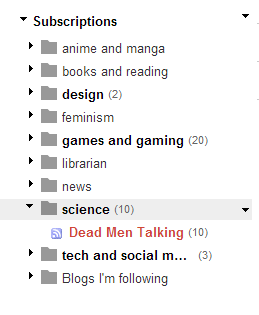

You can see that the feed is now in the appropriate folder. When I add new feeds, I can click on the arrow next to the feed and move it into the appropriate folder.

The numbers next to the bolded folders tell you how many new or unread items are available in the folder.

You can also reassign a feed to a different folder by activating the menu through the arrow next to the feed, or you can perform a mass reorganization by activating the arrow menu next to Subscription and selecting Manage Subscriptions.


You can then change folders, rename feeds and mass reassign feeds to folders from the Subscription management dashboard. Once you are finished, select Back to Google Reader to return to your subscribed feeds.


This method will work with any properly formatted RSS feeds, including Tumblrs, and is a way to follow feeds and keep them organized without subscribing to Tumblr.

Wednesday, December 12, 2012

Finding Self-Storage Auctions

Dave Hester, the famous YUUUUP! man of A&E's Storage Wars, has claimed that highly popular Storage Wars is faked, stating that some of the items found in the storage units are planted items. What this might mean is a renewed interest, or possibly skepticism, in buying good for resale from self-storage auctions.

Clients can find out about auctions in several ways: following the websites of local self-storage facilities, which usually announce the auctions on their websites or on the websites of their affiliated auctioneers. You can find self-storage facilities by searching on the state's self-storage facility association. StorageFront provides a directory of self-storage associations or you can conduct your own search on Google by searching with the name of the state and "self storage association" or "self-storage association". You can also look for individual storage facilities, which may not belong to an association, by searching on StorageFront.

In Canada, there is a national self-storage association, but the list of vendors downloads in an Excel spreadsheet, and the list seems fairly sparse for the entire country.

Your clients can also look at auctioneer websites to find out about upcoming auctions. The National Auctioneers Association provides a Find an Auctioneer directory. You can also search on their Find an Auction service, though these search results will include more auctions than self-storage auctions. There does not appear to be a national association in Canada, so you will have to search by province and "auctioneer association" on Google.

Auction participants usually have to pre-register to attend the auction, either on the auctioneer's website or on the self-storage website. Just showing up may mean that the wannabe storage warrior is turned away or shows up on auction day to find out that the person who was delinquent on paying for the locker has paid up and saved their stuff, so the auction was cancelled. Since an auction can be held for only one unit, showing up for a cancelled auction will waste time and mileage, so pre-registering and checking on the status of the auction the day before is a good idea.

If you win at auction, you usually win the entire contents of the locker--junk and all. The winner needs to be able to haul away all the materials, usually in a truck, as well as disposing of all of the garbage in the locker and most self-storage places won't let you use their garbage bins or brooms, so you need to bring garbage bags, bins and brooms with you, since you may need to sweep out the bin to consider it completely vacated and satisfy the terms of the auction. You will probably also need your own lock so you can secure the locker during the time that you have access to the locker. So not only do you have time and mileage costs, you may need to rent a truck and hire temporary labor to haul out all of the material in the locker. In the case of Dave Hester, he owns his own trucks and has his store crew to help with this part of the process.

What do people do with the stuff they buy at self-storage auctions? On Storage Wars, the participants usually resell their items in their second hand shops. Since they are in California, they need a reseller's license to avoid paying sales tax on the items they won at auction. Other people may resell their items on Ebay, or even on their own auction websites or on Craigslist or Kijiji. Usually items are not resold quickly for the price that the storage warrior needs to recoup their various costs, so if you don't have your own storefront, you may use your home or garage to store items for resale or even rent your own storage locker to hold the items until they can be sold locally or on Ebay.