Showing posts with label presentations. Show all posts

Wednesday, May 1, 2013

MYO wearable gesture control

Rather than talk about Google Glass, as a presenter I'd much rather talk about MYO. MYO is a wearable pointing/computer navigation device that removes the camera from the equation (Kinect = camera).


I see many practical uses for this device, especially if it can be used with the Internet of Things (examples from the McKinsey & Company Insights) or they should have some discussions/swap API with these guys that are using cloudy water to make a display.


I guess we will be seeing MYO in the shower videos.

Tuesday, January 29, 2013

Putting Tumblr in your Reader

Yesterday, I delivered a presentation to my colleagues on Twitter, Tumblr and Prezi. The presentation introduced the service and what they did and how we can use them.

However, I didn't really talk about how to keep track of them or how to keep them organized after you subscribe. For now, I'm going to focus on Tumblr blogs and managing them with Google Reader, since you can use a similar method for Prezi and Twitter (which is still doable in an RSS Reader, but a teeny bit of a pain to configure). This is not the only method, but our office uses Gmail, so we have Reader enabled. This is a simple method to use to keep track of Tumblr feeds without signing up for Tumblr.

Sign in to your Goggle account and activate Reader from the More menu if you have not yet turned on Reader. This RSS reader will be associated with your Gmail account, and you can use it to monitor news, Tumblr feeds, Twitter feeds, and searches that you monitor as RSS feeds.

To put a Tumblr feed in your Reader, you need to get the RSS feed for the Tumblr. For this demonstration, I got the RSS feed from the Tumblr Dead Man Talking (thanks to Science On! for putting together the listing of science Tumblrs).


Click on the RSS feed button and the RSS feed page will appear. Don't worry about the streams of code: you just need to copy the feed address from the address bar in your browser, as shown below.


Copy this feed (select it and CTRL + C), and return to Reader. Once you are in the Reader dashboard, click on the Subscribe button. The add feed field will appear. Paste your feed into this field and click the Add button.


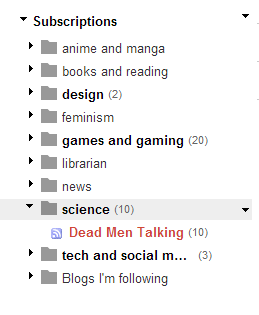
Once you have clicked the Add button, your feed will appear in the Subscriptions block of Reader. You are now subscribed to the Tumblr feed, so you can access it from Reader, with all of your other feeds, without signing up for a Tumblr account.

You can also create a folder so you can organize all of your feeds by topic. Click on the subscription that you would like to organize--in this case Dead Men Talking, since there is no folder that it belongs to. A menu will appear when you activate the arrow next to the feed. From this menu, select New Folder.


A window will appear with a message that says, What would you like to call this new folder. In this case, I want to keep all of my "science" feeds together--not necessarily my Tumblrs, since I will probably also subscribe to the relevant feeds from Nature, Science Magazine, PopSci Science feed and CBC Technology and Science feed, but I can add those and other feeds later to this folder.


You can see that the feed is now in the appropriate folder. When I add new feeds, I can click on the arrow next to the feed and move it into the appropriate folder.

The numbers next to the bolded folders tell you how many new or unread items are available in the folder.

You can also reassign a feed to a different folder by activating the menu through the arrow next to the feed, or you can perform a mass reorganization by activating the arrow menu next to Subscription and selecting Manage Subscriptions.


You can then change folders, rename feeds and mass reassign feeds to folders from the Subscription management dashboard. Once you are finished, select Back to Google Reader to return to your subscribed feeds.


This method will work with any properly formatted RSS feeds, including Tumblrs, and is a way to follow feeds and keep them organized without subscribing to Tumblr.

Wednesday, July 8, 2009

When will the job market recover?

JobBait has provided an analysis, historical and two forecasts, about when the job recovery will occur.

If you are interested in their data and how they reached the conclusions in their analysis, they will be holding a webinar on July 21, 2009, about the analysis. If you work with patrons who are wondering about the job market, or are interested in labor market analysis yourself, you may want to sign up for the webinar.

Thursday, June 18, 2009

Seeks success stories

The ALA Emerging Leaders Group G is looking for success stories from librarians who have used ALA Human Resource services to find work:

If you found the perfect job thorough the ALA Placement Center, located the perfect candidate at a conference or successfully revamped your resume with the resume review service in the Placement Center, the group wants to hear about it. No story is too small, no story too large. (Original call with details on how to submit)

You can submit via email or on YouTube.

Thursday, February 5, 2009

How to stream your presentation

Presentations: a requirement in almost every library interview. But if you could make your pitch before the live audience, should you?

Though clearly showing the effects of too much Red Bull on the undergraduescent Hack College explains the technical issues very pimp-ly...um... simply.


And he's right: why not get more mileage out of your classroom presentations? If you have to make presentations in class or during your internship, and you are comfortable with being filmed and the audience is game, go ahead. There is no guarantee that all of your effort is going to lead to a reward, but if we looked for a reward for all of our efforts, we'd just stay at home and watch reality TV.

You might want your video to look more like ZdNet's Whiteboard video, (and use a tripod but not a spider), and for more ideas on how to use pictures in presentations, read Back of the Napkin by Dan Roam.

Thursday, June 19, 2008

Presentation Masters

Inspired by How to Make a Presentation Like Al Gore.

The dreaded presentation, the dreaded hair puller and teeth gnasher for all library interviews. The easiest way to get ready is to, well, practice public speaking, but it also helps to watch the masters. Here are two of the presenters that I enjoy watching.

Steve Jobs is highly regarded for his presentation style, with just a dollop of Barnum. He is casually dressed, uses the whole of the stage and has very simple and eloquent slides (I hope we are moving in that direction) and people are mesmerized by him, usually because he can make people sigh with joy at the sight of a manila envelope. A sample, the WWDC keynote, is available for viewing.

You could decide to move to a more folksy, mellow evangelist style--without the ladders--and present like Al Gore. He has a very relaxed style, but I think his documentary, An Inconvenient Truth, won people over, not only for his reputation, but also because of his down home, pass-the-salvation-preacher speaking style. Possibly the most kick-ass Power Point to win an Oscar.

Now both of these presenters have highly theatrical styles, as well as the leisure and incentive to rehearse, since they know every flinch will be discussed on YouTube (or viciously captioned Nico Nico Douga-style) and their styles may not appeal to you. There are endless samples of good speakers who engage their audiences and make tough ideas simple and/or engaging, such as Helen Fisher, Susan Blackmore, or Erin McKean. You should also notice that these speakers do not hide behind a pedestal podium (Holy Dr. Freud!) or a table--they have other props: Simple slides.

If you would like to use slides, I suggest moving to the format used by Jobs, since they are simple, plain and memorable. Garr Reynolds of Presentation Zen--who has done some really cool presentations on Slideshare where he booktalks the practical uses he found in two business books, Brain Rules for Presenters and Career Advice--has excellent ideas on how to make great, clear slides in the jobs style. Or maybe Jobs borrowed from Reynolds?

You can improve your presentation style through practice, but also through good models.